Select Your Language
We've detected you're browsing from . Choose your preferred language:
We've detected you're browsing from . Choose your preferred language:

Checkout using your account
Checkout as a new customer
Creating an account has many benefits:

You can purchase Silhouette Studio® upgrade editions from our authorized retailers .
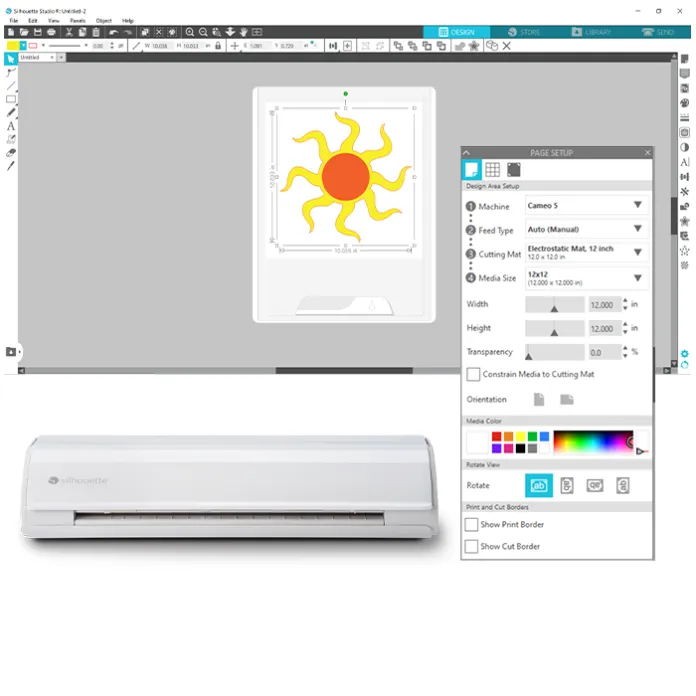
Silhouette Studio provides design tools suitable for creating both simple and complex projects. The interface is structured to support new users while offering advanced functions for detailed design work. Projects can be prepared directly for cutting within the same software environment.
The Basic Edition of Silhouette Studio is available at no cost and includes core design tools. Additional features can be unlocked through optional one-time upgrades. No subscription is required for continued use.
Silhouette Studio includes a built-in tracing feature that converts images into cut-ready designs. Users can import an image, adjust tracing settings, and prepare files for cutting without additional software. This supports efficient preparation of customised projects.
Silhouette Studio provides access to the Silhouette Design Store. The library includes hundreds of thousands of ready-made designs across a wide range of categories. Designs can be used as provided or customised to suit individual project requirements.

Silhouette Studio is a robust, free design software that gives makers the freedom to imagine, design, and create unique craft projects. With dozens of design tools and easy integration with Silhouette cutting machines, Silhouette Studio is the ultimate tool for crafters who want to make their own unique, personalized projects.

Customize designs, create projects that meet your needs, and use the perfect cut settings for complete control over your crafts.

Premium design features like tracing, warping, welding, and more give you the power to design anything you can imagine. Access even more tools by upgrading to a paid edition of the software.

Silhouette Studio gives beginners a smooth introduction to designing and offers all of the tools seasoned designers are familiar with. Easy navigation and quick integration with your Silhouette cutting machine makes the design process a breeze.

Yes! Silhouette Studio can be used offline- perfect for traveling or working without Wi-Fi. Any Library content that has already been synced to your device will still be accessible. Once downloaded, your synced Library content is stored locally on your device and can be used offline. You’ll also retain access to your software upgrade edition features while working offline.
Find answers to common questions about Silhouette Studio features, installation, and usage.
Get the user manual here:
SS V5.0_User Manual - ENG
Alternatively, you can access the manual directly within Silhouette Studio by selecting Help from the top menu and choosing User Manual.
For step-by-step installation guidance for Windows and macOS, please visit our
installation guide page.
You can also watch our YouTube installation video
here.
For a step-by-step demonstration of the Print and Cut process, including registration mark setup and cutting alignment, please visit our video tutorial.
You can run only one machine at a time with the Basic Edition. If you want to run multiple machines simultaneously, you need to upgrade to the Business Edition (one-time purchase).
In some cases, macOS permission or security settings may interfere with software updates. If the application is no longer visible, please download and reinstall the latest version from the official Silhouette website. If you are using macOS Tahoe 26, please ensure that you are running Silhouette Studio version 5.0.414 or higher.
After purchase, designs may take up to 15 minutes to synchronise with your account. Please ensure you are signed in and refresh your Library Sync within Silhouette Studio if needed.
Free designs are added to your account once your machine has been registered. Please ensure you are signed in to Silhouette Studio to access them.
If you imported an image file, you may need to use the Trace feature to create cut lines before sending the design to your machine.
Opening SVG files requires Silhouette Studio Designer Edition or a higher edition. Saving designs as SVG files requires the Business Edition.
Unlock more creative potential by upgrading to a paid edition of Silhouette Studio®
Features |
Basic edition |
Silhouette Studio® Basic to Designer Edition (digital) |
Silhouette Studio® Basic to Designer Edition Plus (digital) |
Silhouette Studio® Basic to Business Edition (digital) |
|---|---|---|---|---|
|
Create designs and send to silhouette  |
 |
|
|
|
|
Basic design and text tools |
|
|
|
|
|
Manipulation tools: move, rotate, scale, align, replicate |
|
|
|
|
|
Pop-up creator (Advanced) |
|
|
|
|
|
Ability to import custom patterns |
|
|
|
|
|
Lasso selection |
|
|
|
|
|
Warp templates |
|
|
|
|
|
Advanced rhinestone features |
|
|
||
|
Import embroidery files (PES, DST, EXP, JEF, and XXX) |
|
|
||
|
Flexishapes |
|
|
||
|
Puzzle generator |
|
|
||
|
Advanced warp (Conical, Perspective) |
|
|
||
|
Import Ai/CDR/EPS files |
|
|||
|
Weed line feature |
|
|||
|
Multi-cutter support |
|


Not a designer?
Create your own projects with over 200,000 ready-made designs available in the Silhouette Design Store . Download your favorites and get crafting in minutes.


